What are you looking for?
Puzzle types
The rules of every puzzle – each with a small example.
Time & progress
Daily puzzles, penalty time, best times, XP and board designs.
Arena
Duels, points, friends and invitations.
Events
Weekly challenge, Advent calendar and solving together.
FAQ
Short answers to the most common questions.
The start screen
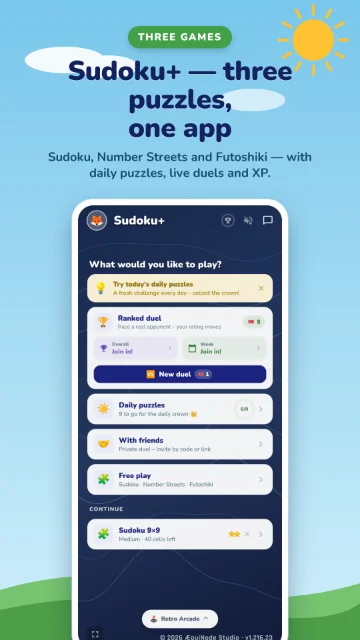
When you open Sudoku+ you land on the start screen. Everything starts from here:
- Ranked duel – take on real opponents and climb the leaderboard (more).
- Daily puzzles – new puzzles every day, the same for everyone. Solve all nine for the daily crown 👑.
- With friends – a private duel via code or link.
- Free play – Sudoku, Number Streets and Futoshiki at your own pace, with no penalty time.
- Continue – unfinished puzzles wait here; tap ✕ to clear a free-play puzzle.
How to use the board
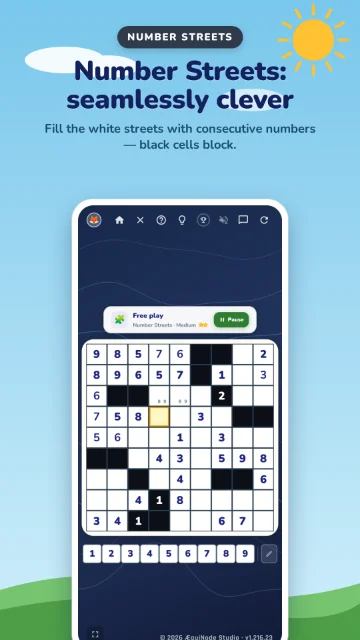
- Pick a cell: tap an empty square. It turns yellow and its row, column and box light up.
- Enter a digit: tap the number below the board. With a keyboard you can also press the digit key.
- Notes: the pencil button next to the digits switches to note mode. Now you jot down small candidates without committing.
- Hint: the lightbulb at the top gives you a nudge. On “Easy” and “Medium” the first press marks the cell, the second shows the number. On “Hard” there are no hints.
- Pause: “Pause” stops the puzzle; your progress is saved.
Notes in detail
In note mode your digits go into the cell in small print – every possible number has its own spot in a 3×3 grid. Cross off candidates as soon as they show up in the row, column or box. When only one is left, enter it for real.
The buttons at the top
Account & sign-in
Free play works without an account. For daily puzzles, duels, leaderboards and continuing on several devices you sign in – free and without a password.
- Open Your account (avatar at the top left) and enter your email address.
- We email you a code. On a phone you can tap the link in the mail, otherwise just type in the code.
- Done – “Signed in ✓”. Your progress now syncs across all your devices automatically.
Profiles
One account belongs to one person: your play profile plus up to 4 kids profiles. A kids profile starts straight in the colourful 4×4 board – with no daily puzzles or duels. You set name and avatar (or photo) under “Edit profile”.
Data & deleting your account
Everything is in the privacy policy. You delete your account with all its data in the app under “Delete account” or via the page Delete account & data.